Performance and Reproducibility
Use this page to choose a practical execution route before launching expensive runs.
Solver and device selection
Situation |
Recommended route |
|---|---|
Validate a public YAML configuration |
|
Small or moderate float64 validation run |
CPU first, especially when GPUs are queued |
Large dynamic trajectory run |
CUDA if available and queue wait is reasonable |
Quasi-static fracture |
|
Optional sparse-solver backends |
Use PETSc/MUMPS or cuDSS only where the capability matrix and local doctor output support the selected route |
Optional iterative acceleration or preconditioning |
Use AmgX or PyAMG only where the selected workflow documents support and the local doctor detects the dependency |
Optional visualization |
Use PyVista for supported post-processing workflows; it is not a linear-solver backend |
PhAST’s reference public runs use double precision where the mechanics and damage kernels require it. CUDA and CPU float64 are the most reliable choices for publication runs. Apple MPS can be useful for exploratory float32 work, but spectral/eigenvalue-sensitive fracture runs should be verified on CPU or CUDA float64 before being used as evidence.
When submitting to HPC, prefer CPU nodes for runs that are memory-safe and would otherwise wait behind GPU jobs. Use multiprocessing or array jobs only when each case writes to a separate output directory and the manifest records the exact command.
Always pass an explicit --output_dir for reproducible runs. Timestamped or
temporary output folders are convenient during local exploration, but paper
artifacts should live in stable directories with the corresponding config,
metadata, lockfile, CSV histories, and visuals kept together.
Reproducibility checklist
Validate the YAML configuration.
Run with an explicit
--output_dir.Keep
run_manifest.json,run_metadata.json,run_lockfile.json, CSVs, visuals, andvisual_manifest.jsontogether.Store
training_data.zarrtrajectories outside git unless they are intentionally published as external release artifacts.Inspect outputs with
phast.load_result(path).
See docs/user_guide/example_contract.md for the artifact contract.
Benchmark policy
Performance comparisons are engineering snapshots, not fixed product claims. Solver versions, optional backends, hardware, threading, tolerances, mesh regeneration, and output settings can all change the result. Rerun the public YAML configuration and record the generated manifests before using a timing number in a paper, proposal, release note, or external comparison.
For fresh timing work, start from the same public entry points used by the examples:
python -m phast run examples/dynamic/B2_kalthoff_winkler/config.yaml --device cuda --output_dir runs/B2_kalthoff_winkler
python -m phast run examples/dynamic/B3_dynamic_sent/config.yaml --device cuda --output_dir runs/B3_dynamic_sent
python -m phast run examples/quasistatic/miehe_tension/config.yaml --output_dir runs/miehe_tension
When publishing a timing comparison, report the exact command, device, PyTorch
version, mesh size, time step or load-step count, enabled output writers,
run_lockfile.json, and run_metadata.json. Avoid reusing older timing tables
unless the external solvers were rebuilt in release mode and the PhAST run was
regenerated with the current public configuration file.
Dynamic timing comparison
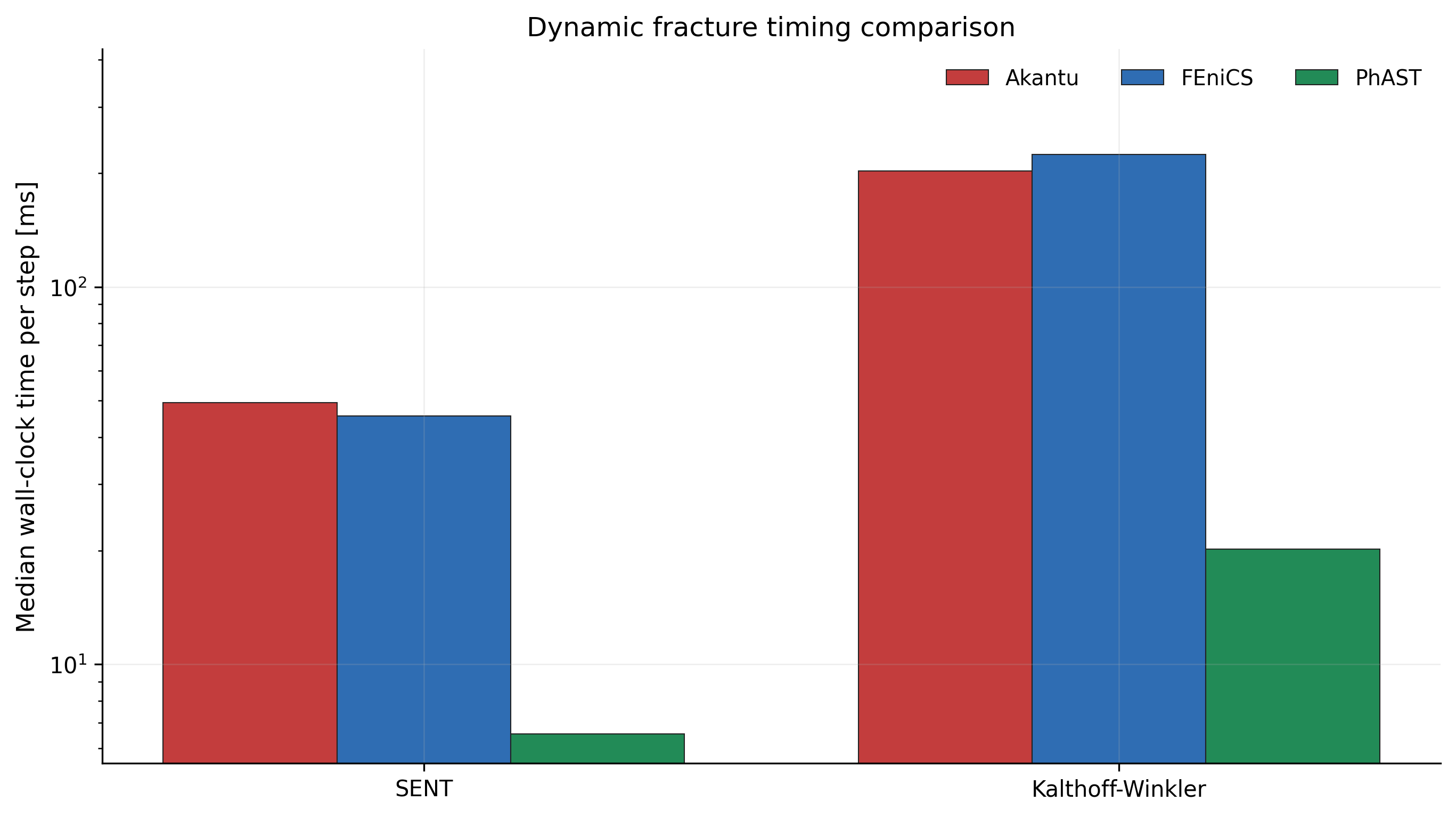
This figure is regenerated from the current SENT and Kalthoff-Winkler timing
CSVs using Akantu, FEniCS, and PhAST final timing traces. Treat it as a
reproducibility artifact for the public performance discussion, not as a
universal hardware-independent claim. The source summary CSV is kept at
assets/dynamic_timing_comparison.csv.
Hardware optimization and torch.compile
PhAST can use torch.compile for selected CUDA tensor kernels, most notably
matrix-free damage-solver products where the operator shape is stable enough to
benefit from compilation. The control lives in the YAML device block:
device:
  device: cuda
  compile: true
Set compile: false for short validation runs, CPU-first checks, macOS/MPS
verification, or small examples where compile warmup can dominate the measured
runtime. For long CUDA runs, compare both settings on the same mesh and output
schedule before reporting a speedup.
When publishing a torch.compile timing, report:
PyTorch version and CUDA version;
GPU model and driver;
whether
device.compilewastrue,false, or selected by the runtime policy;warmup treatment and number of timed steps;
mesh size, field precision, and enabled output writers;
the generated
run_lockfile.jsonandrun_metadata.json.
Do not treat a locally observed compilation speedup as portable until it has been regenerated with the public configuration, hardware description, and retained timing artifacts.